
Log in to Pathways
Pathways is an online resource that provides physicians and their office staff quick access to current and accurate referral information, including wait times and areas of expertise for specialists and specialty clinics. Pathways also provides access to hundreds of patient and physician resources, a searchable community service directory and a medical care directory.
Originally developed by the Fraser Northwest Division of Family Practice, Pathways is now available to all divisions of family practice across BC.
In 2019, Pathways rolled out:
- A public-facing community service directory in select communities. This enables patients to quickly and easily search for community services and programs in their local area.
- The Pathways Referral Tracker, which allows physicians and their staff to send and track referrals within Pathways through a common dashboard, securely communicate between GP and SP clinics, send referral documentation, and enable electronic notifications to be sent automatically to patients once they have been wait-listed or had an appointment booked.
Who can use Pathways?
Access to Pathways is limited to family doctors who are members of a division of family practice, their staff, and/or nurse practitioners, and specialists who fall within the geographic boundaries of these divisions.
With the addition of the new public facing community services sites, the public will be able to access just the community service portion of Pathways, while specialist and clinic information remains login access only.
How is Pathways funded?
Funding for Pathways is provided through the General Practice Services Committee (GPSC), a joint collaboration between Doctors of BC and the BC government. Individual divisions of family practice also contribute operational funding at a local level.
How do patients benefit from Pathways?
Pathways streamlines and simplifies the patient referral process, resulting in more appropriate referrals, a reduction in re-referrals, and thereby more efficient patient care. The information in Pathways (e.g., wait times, details on specific areas of practice) enables family doctors to identify the most appropriate care provider to address their patients’ needs in as timely a manner as possible. With the new Referral Tracker, patients will actually know where they are in the referral process without needing to call their family doctor or specialist office to find out. Patients can receive recommendations of relevant social services directly from their physician, which they can now further explore on their own within the public facing community service sites.
How do physicians benefit from Pathways?
Family physicians benefit from having all information needed to make an appropriate referral at their fingertips, all in one place. They can also use the resources in Pathways to help educate patients while in the exam room, using evidence-based material to potentially avoid inappropriate or unnecessary referrals. For specialists, contact information, referral forms, and even patient instructions are all listed in their Pathways profile, which means less time spent on the phone for office staff having to communicate this information. Having the ability to provide very clear instructions about what type of referrals they do and do not accept results in a higher quality of referrals overall.
How is Pathways organized?
The provincial Pathways support team provides the technical infrastructure to operate the Pathways website and also provides administrative support to help guide divisions of family practice in their implementation and maintenance of Pathways locally. Individual divisions also provide Pathways Administrators to curate specialist and clinic data within their local region.
For more information visit the Pathways website or contact their team at contact-us@pathwaysbc.ca.
- Pathways Medical Care Directory
Approximately two-thirds of family doctors in BC have already signed up to list their profiles on the Pathways Medical Care Directory (previously called the Pathways Virtual Care Directory).
Pathways is a free online directory that helps patients access information about how their family doctor is currently providing care, including updates about flu shots and COVID-19 testing. Patients can look up their doctor, find out how they’re providing virtual and in person care, and find instructions about how best to set up an appointment.
The directory listing can serve as a clinic website for physicians who don’t have one. For physicians who do have a website, it can be linked to their Pathways page. The goal is to offer the public a one-stop location for finding physician office information, and to provide support to physicians in updating and maintaining their online information.
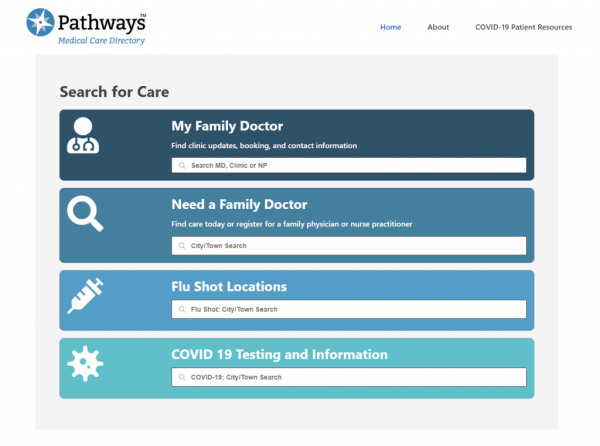
Please look at your listing to see if there is anything you would like to add by clicking the link at the bottom of your listing page. All doctors are encouraged to add their practice information to the Pathways Medical Care Directory by filling out this Pathways Medical Care Directory form.
- Benefits of using Pathways
To GPs:
- Help identify the most appropriate specialist for a patient’s needs with the shortest wait time.
- Make better informed referrals by providing information about specific areas of practice, areas of special interest, or specific cases specialists will not accept (ie. WCB, paediatric patients).
- Provides a single access point to locate specialist/clinic contact details, patient instructions, and referral forms, reducing time consuming phone calls for office staff.
- Provides access to patient resources that can be shared while in the exam room and even emailed to patients, some of which can be used to prevent inappropriate referrals.
To specialists:
- Decreases the incidence of inappropriate referrals by clearly outlining areas of practice and cases that will not be accepted, allowing for more efficient use of time.
- Specialists have full use of Pathways and can use it to refer to another specialist, health authority program, or GPs in the community.
- Saves office staff significant time answering calls about schedule, contact information, referral forms, etc.
- Provides a host of resources searchable by specialty, including calculators, algorithms, decision aids, and risk tables.
- Offers an opportunity for new specialists to quickly build a patient panel, or communicate changes, such as a new location or languages spoken on site.
To the health system:
- Offers the potential to optimize wait times throughout the system, reducing the burden on specialists with extremely long wait lists, and helping identify specialists with shorter wait times (ie. recently certified or new to the community).
- Reduces inappropriate referrals and the need for re-referrals, driving down costs to the health care system.
- Can be used as an attachment mechanism for patients without an existing family physician (by specialists looking to refer to community GPs).
- Pathways Referral Tracker
Preparing for the Pathways Referral Tracker
What is it?
While Pathways has always been used as a tool to inform decisions about patient referrals, the addition of the Referral Tracker to Pathways will now allow physicians and their staff to send and track referrals as well!
Features include:
- A collaborative dashboard (accessible through your existing Pathways account) where both GPs and specialists can track patient referral status (ie. sent, received, patient wait listed or booked).
- The ability to use your existing office workflow to send a referral letter and accompanying documentation to the specialist clinic.
- Secure messaging between GP and specialist offices through the dashboard.
- Automated electronic patient notifications sent by email or text, including patient instructions.
Benefits to physicians
- GP offices know exactly when a specialist has accepted, waitlisted, or booked a patient.
- Electronic patient notifications significantly reduce MOA workload and improve communication with patients.
- Reduction in no-shows because appointment reminders are sent to patient 1 week and 48 hours before the appointment, plus GPs no longer feel pressured to make multiple referrals for a single patient.
- Each step of the referral is easily viewable in real time within the referral tracker dashboard and an audit trail is provided.
- Communications between GP and specialist offices are streamlined significantly, improving collegiality.
Benefits to patients
- Patients actually know where they are in the referral process without needing to call the GP or specialist office to find out.
- Patients receive electronic notifications that contain a link to confirm the appointment and that contain pertinent instructions.
- Notifications are sent to patients upon being waitlisted and once their appointment is booked. Reminders of the appointment are sent 1 week and 48 hours before their appointment.
Implementation timeline
Pathways has been working with the White Rock/South Surrey Division to pilot a prototype of the Referral Tracker. The pilot phase ended as of December 2018 and currently work is ongoing to expand use of the Referral Tracker to the rest of the Division.
Following implementation of the Referral Tracker to the rest of White Rock/South Surrey, we plan to start expansion to additional Divisions in 2019.
Preparing for implementation
There are a number of steps that Divisions can start working on now to prepare for implementation of the Referral Tracker.
- Create profiles for all family physicians.
In order to access the Referral Tracker dashboard in Pathways, GP users must have a profile created on Pathways (different than a user account). While each Division has had the discretion in the past to choose whether or not to list family physicians, this step will be required prior to implementation. A short form version of the survey (ie. only name and contact information) will be provided to facilitate this data collection.
- Transition group access keys over to individual keys.
Whereas Pathways has historically given Divisions the option of offering both individual and group access keys, only individual keys will be allowed for users wishing to use the Referral Tracker. This is due to the fact that Pathways must maintain an adequate audit trail of the various steps in each patient referral. Pathways Administrators will be required to provide individual keys to anyone (both physicians and MOAs) who do not yet have an access key.
- Collect consent forms.
One of the particularly helpful features of the Referral Tracker is the ability to send electronic notifications to patients. However, patients must first provide consent in order to be contacted in this manner. Clinics can start working now on collecting these consents so that they are prepared in advance for implementation. Pathways provides a short one page consent just for using the Referral Tracker, or the longer CMPA form that applies to all electronic communication from a physician’s office, if you also plan on communicating with patients outside of the Referral Tracker.
- Identify champions.
One of the important learnings from the White Rock pilot was the importance of being highly engaged with GPs, specialists, and MOAs throughout the process of implementation. Having champions from each of these groups who can reach out directly their peers and demonstrate enthusiasm for the project goes a long way to driving success!
- Pathways Community Services Directory
Goals
- Pathways Community Services will be an enabler of high-quality patient care, complementing or providing alternatives to purely biomedical treatments, including a focus on the social determinants of health (ie. enabler of “social prescribing”).
- Consolidate a wide variety of services in one place, inside of the existing Pathways web platform users are already familiar with and using frequently.
- Facilitate navigation of the complex world of community services through robust search and filter functionality, allowing users to find the most appropriate services very quickly.
- Content is provided to Divisions without the added workload of data entry/maintenance, which instead will be provided by provincial staff.
Benefits to physicians
- Services can be found quickly, in the span of a patient visit, without having to flip through multiple other directories, and emailed directly to the patient from Pathways.
- Provides additional options in developing a treatment plan. For instance, for a patient struggling with depression, a physician could send examples of services that deal with social isolation before starting antidepressants.
- Pathways can point you in the right direction if you don’t know exactly what to search for – you can see all the services that exist in a category or narrow your search very specifically.
- See only services that are relevant to you – those that are available provincially and within the immediate surrounding municipalities. No more skimming through long lists to find the services that applies to you!
Benefits to patients
- Patients receive recommendations of relevant social services directly from their physician, which can then be explored further on their own on public facing Pathways.
- Significantly more robust search and filter capabilities than other online service directories, making Pathways Community Services extremely user friendly and quick to use.
- Returns only relevant results, allowing patients to narrow their search to very specific topic areas, and gives only service listings in their local community (or those that apply provincially).
- Patients can receive recommendations of relevant social services directly from their physician, which can be particularly meaningful.
Find out which Divisions have a public-facing Community Services Directory.